920002157
 support@bontech.sa


Clearer Order Visibility
View incoming orders from POS, table service, and QR ordering on a single clear KDS System screen



Send orders from POS, tables, and QR ordering directly to the KDS Kitchen Display System, so your team can prepare faster, avoid missed details, and keep service moving during busy hours.
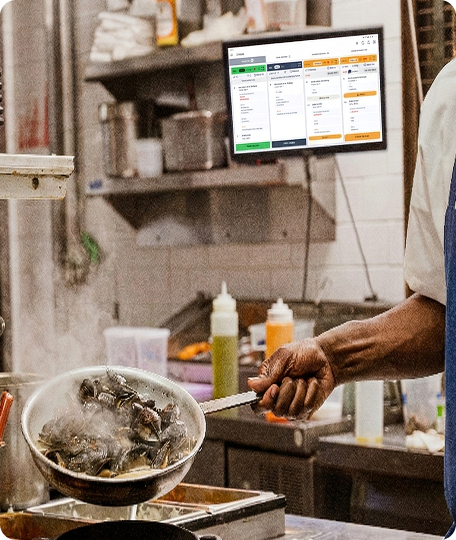
View incoming orders from POS, table service, and QR ordering on a single clear KDS System screen
Help your team move orders through the kitchen with less delay using a real-time KDS.
Keep front-of-house service and kitchen teams fully aligned during peak hours with an integrated Kitchen Display System
Reduce confusion caused by lost paper tickets or repeated verbal updates by digitizing your workflow via a Kitchen Display System (KDS)
Keep kitchen orders connected with your POS, table workflow, QR ordering, and menu details without extra manual steps using our KDS System
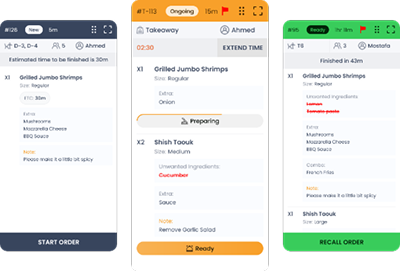
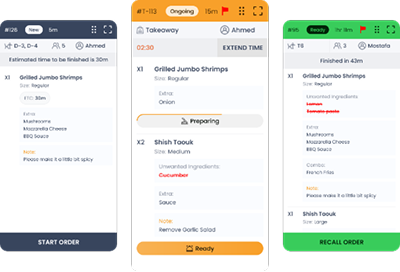
Show each order with item details, modifiers, notes, and table information on the kitchen display system so the kitchen always knows exactly what to prepare.
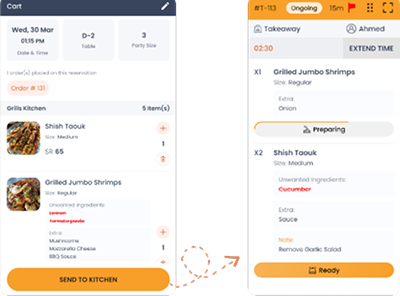
Show each order with item details, modifiers, notes, and table information on the kitchen display system so the kitchen always knows exactly what to prepare.
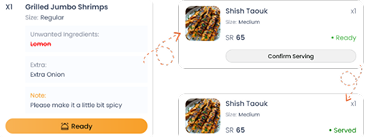
Track orders from "received" to "preparing" and "ready" inside the KDS, ensuring both kitchen and service teams follow progress clearly.
Receive orders from POS, table service, and QR ordering directly into your KDS system without manual re-entry.
Use powerful kitchen display system reports to understand order speed and team performance across daily operations.
Follow service pace more clearly and identify delays that affect kitchen flow during busy hours.
Get a clearer view of order activity across daily operations and track kitchen demand confidently.
Track service-side performance to understand how staff coordination impacts your overall KDS workflow.
These are just a few examples of the reports available with our KDS system.

Connect KDS with POS, menus, and inventory tools for a more connected restaurant workflow.
BonTech KDS shows orders in real time from POS, tables, and QR ordering, so your kitchen can see what to prepare, follow priorities, and keep service moving without manual handoffs.
Book a demo